
Thanks for returning for part 3 of my Submissions to Sprints story!
This is the final entry in the series! Next week, we’ll take a breather with some basics—because this one dives deep into customizing Jira. Sorry, not sorry—I love this tool!
While the Open For Test Trello board was in action, I really dug into Jira and what it could do to help keep the good bits of the Trello while also learning and building on the learnings of its flaws.
With a QA Jira project, we could more easily align with Sprints in the Jiras of any other projects. Eventually, the QA team ended up in a “one behind” cadence with the rest of the team. For example, everything the team completes in one Sprint is then tested by QA in the next sprint.
Honestly, this could have been done with a basic task assigned to QA in a project’s Jira—but for me, that wasn’t enough. I needed more structure, more traceability, and I wanted a step between testers and developers to ensure a standard of communication, regardless of who was testing.
And so, my QA Jira was born.
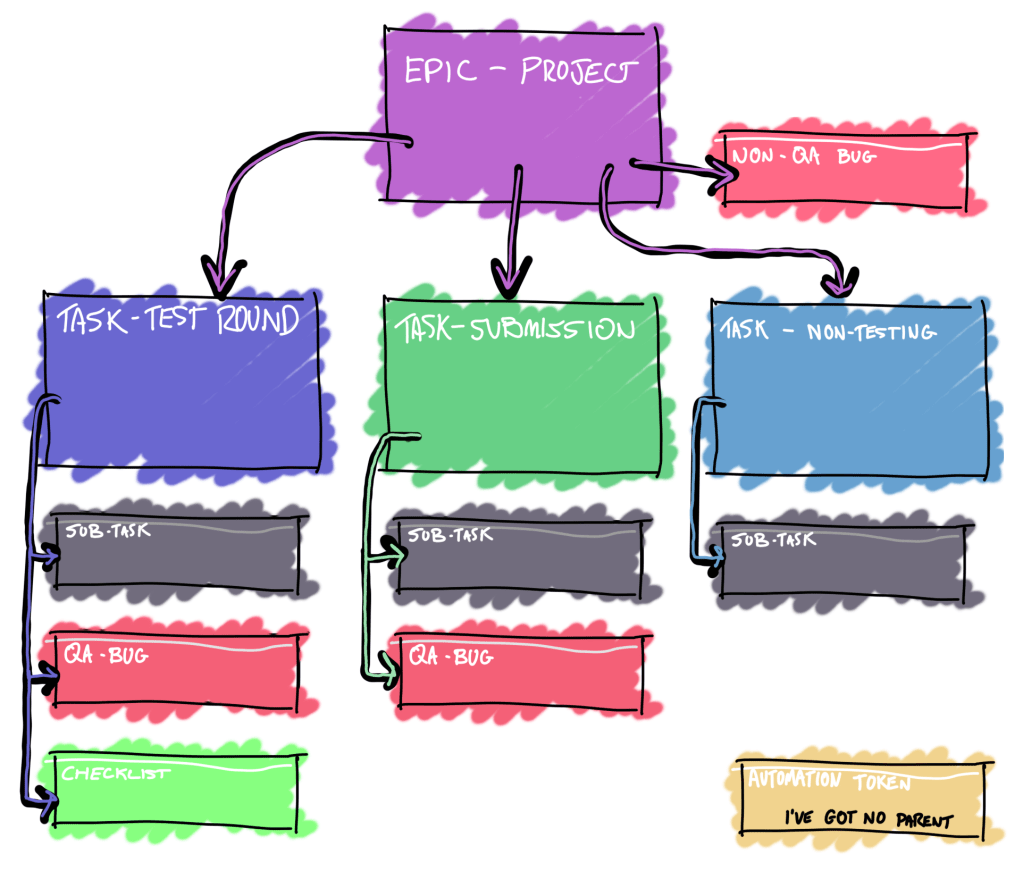
It has four basic Jira issue types, Epics, Tasks, Bugs and Sub-tasks with the addition of a few custom issue types:
Test Round
Submission
Non-Testing Task
QA-Bug
Checklist
Automation Token
They follow the hierarchy displayed in the wonderful image below.
Shoutout to the non-Jira nerds who’ve stuck with me this far—you’re the real MVPs!
How it works
In my QA Jira, every project has an Epic under which everything QA do that is associated with the project is logged.
The Epic card itself holds handy, relevant information like the project’s Confluence pages, the team and template data used to automatically fill description fields.
Any scheduled testing is tracked as a “Test Round” issue type.
Any ad-hoc testing is tracked as a “Submission” issue type.
Anything else, that is tracked as a “Non-Testing” task.
I have this structure so that any bug found by a tester is logged directly under the testing that took place when it was found.
The QA Jira effectively behaves as a bug triage for all projects, and when a bug is fully vetted, it is cloned into the backlog of the Jira that associates with its parent Epic.
You may have noticed a “Non-QA Bug” task in the image. This is a bug that is found outside of the QA team. It is created via a web form, then reproduced and vetted before being sent to a project’s backlog.
At this point, I’d like to explain a “Submission” a little more. They’re created when a member of the dev team clicks an “action” button on any task they’re working on. They’re asked for a few details about what they’d like testing, much like when a feature was ‘Open For Test’ on Trello—except now, the two tasks are linked. They give the dev team more flexibilty for some impromptu testing whilst also keeping everything nice a structured. They complement a Test Round which is generally a much large and pre-discussed and scheduled period of testing.
The Test Rounds can be fully automated. All of our Test Cases and their Test Scripts are stored in confluence. One a week, a node.js script scrapes the confluence to get up-to-date Test Case information. It then queries Jira projects via the API and analyses the data it recieves to determine how trustworthy a feature of a game is. Anything feature that isn’t particuarly trustworthy, the script will find the assocaited Test Cases, it previously aquired during the scraping, and ensure they’re in the next Test Round.
The Jira projects the script queries to assess a features trust level are called “Trust Trackers” and we’ll dig into them at a later date. They’re my Jira pride and joy.
We’ll wrap it up here for today! I haven’t gone in-depth on workflows for each issue type, but they’re a crucial part of the process. I’ll break them down in a future post.
FInal Thoughts
This three part series was all about how I adapted Certification structures to an embedded QA role that works alongside sprints and I think I’ve achieved that. People who have worked in either place should see something familiar in the structure of my QA Jira.
- Everything is organised by “applications” or projects.
- Items that need testing are “submitted”, scheduled in a sprint cadence and scheduled based on risk.
- Bugs are reported under a feature version being tested.
- Bugs are vetted before being sent to Producers for Review (PR’d) in the next sprint planning.
I really hope this helps others in Certification see how their skills translate into a dev environment.
Have you made the transition from certification to embedded QA? Let’s discuss in the comments!
 Cayne's QA Blog
Leave a comment